
Use Custom Certificate
An X.509 certificate and associated private key are required if SAML messages sent by our service provider (SP) are to be signed (When the Sign Request option is enabled) .
Certificate is published with your SAML metadata and is freely distributed to your relying parties. Private key, just as it’s name says, should remain private and for your eyes only. Due to security issues, certificates expire after some time, and you have to renew them in order to keep SAML signing working.
By default, Our SP uses the tenant private key to sign SAML requests (When the Sign Request option is enabled ).We recommend to provide your own credential key pair to ensure secure data transfers with identity providers.
The steps below are an example of the process for generating a public/private key pair for key exchange, using OpenSSL. To execute the following commands, you will need an OpenSSL runtime installed (which you can download and install from the OpenSSL website, or install one from your operating system’s package management system) .
1) You can generate your own certificate and certificate using this command :
openssl req -new -x509 -days 365 -nodes -sha256 -out sp_certificate.crt -keyout sp_private.key2) Provide information at each prompt .
Two files, sp_certificate.crt and sp_private.key, are created in the directory where you ran the command .
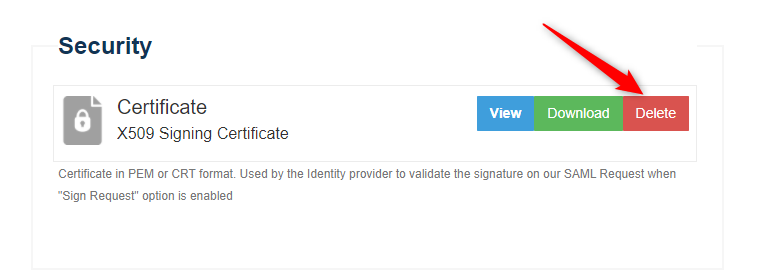
4) In Security section, click Delete on the certificate you want to delete. The Delete Certificate window displays. Click Yes to confirm. Otherwise, click No.
5) Add your last generated files here
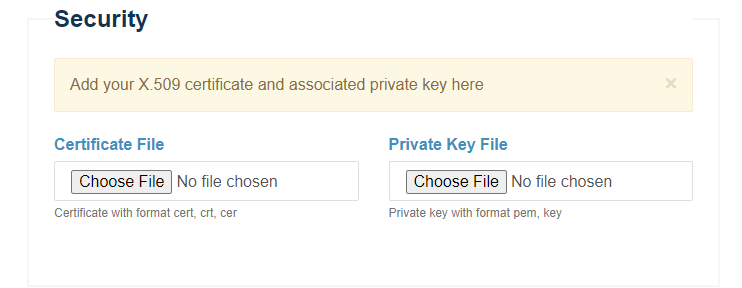
6) Click on Save
Use certificates with strong cryptographic keys for digitally signing or encrypting SAML messages, and renew or replace the certificates every three to five years.
Neither the private key file nor its password should be shared with third parties .
Make sure that all of your certificates are valid, and have not expired or been revoked.
Enabling signed requests requires that the IDP be updated whenever the signing certificate used by the SP is renewed or replaced.