
FAQ and Troubleshooting
This section contains common SAML problems you might encounter and help you to diagnose and fix issues related to SAML SSO authentication.
When testing and debugging the configuration, an option is to view the messages in the log files. A detailed cause of the failure will be printed in case something goes wrong.
You can find detailed information from every step in the process. This allows for an easy analysis of where potential configuration errors recite. Will also allow for detailed response messages to the user trying to sign in. By default, every failed login attempt always results in this message:" Failed Authentication .” After enabling trace logging, you can see the exact cause of the failure in the browser. In case of exceptions, you can even see the stack trace.
You may inspect the ConcreteCMS logs to help pinpointing the problem cause. Please refer to How can I enable logging in ConcreteCMS documentation.
Choose SAML Service Provider Channel
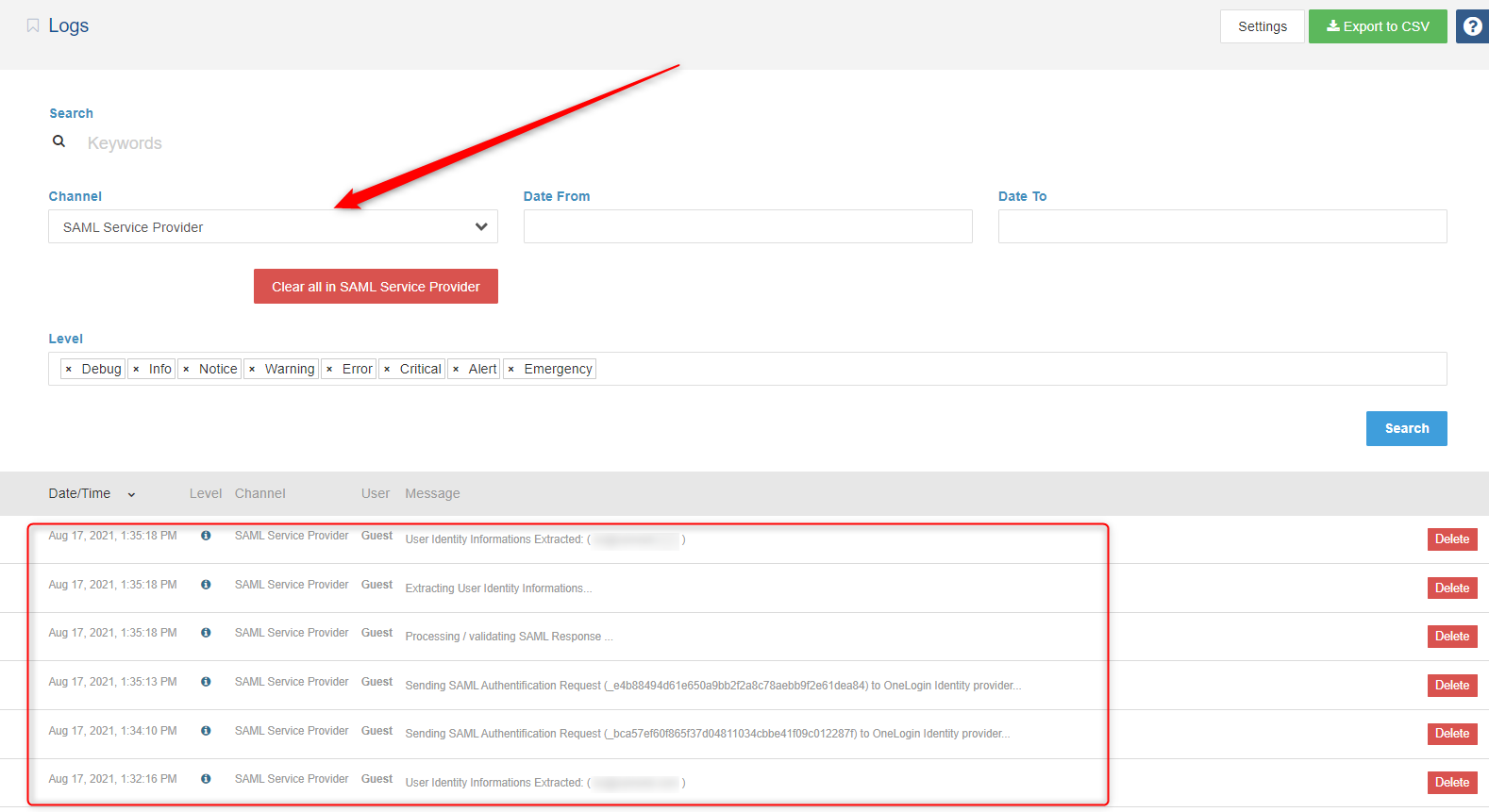
Debug logs may contain more detailed information about the error.
At some point it may be necessary to confirm/view the SAML message that is actually being released from the IdP and sent to us during the authentication process ; You can view SAML trace logs by installing SAML Tracer extension on your web browsers. To install SAML Tracer :
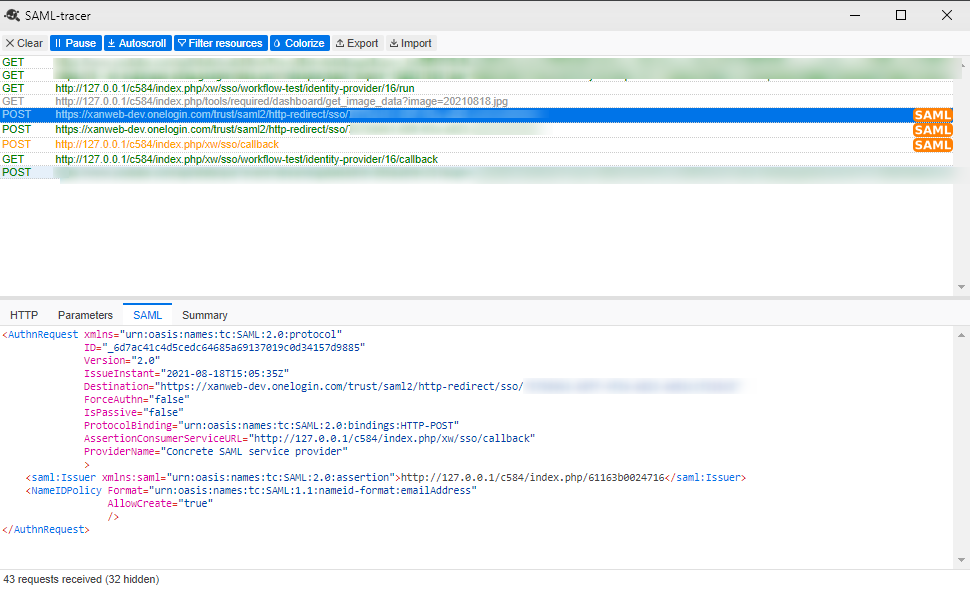
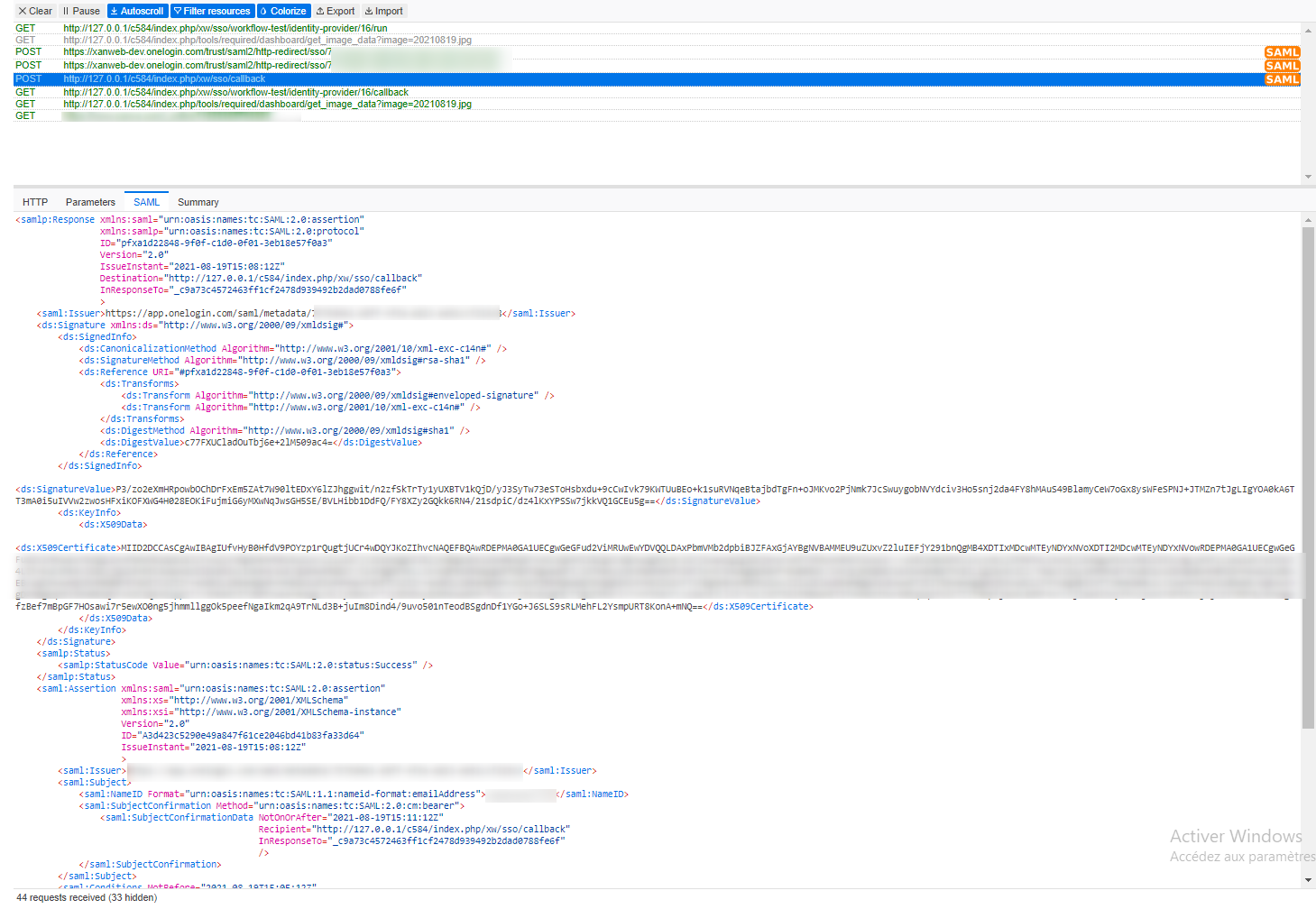
This section includes some samples to show you what SAML requests and SAML responses might look like ( Using SAML-Tracer ) .
This example below shows a sample SAML Request .
This example below shows a sample SAML Response .
If an error appears before you are redirected to the IdP's login page, the IdP's metadata may be invalid.
If an error appears after you log in on the IdP's vendor page, the reasons could be that:
FAQ
After successfully Login in the Identity provider side nothing happens.
If your SP redirects the request to the identity provider (IdP), but the IdP does not return its SAML sign-in page. The IdP can fail to return the sign-in page for any of the following reasons:
-
Assertion Consume Service (ASC) Endpoint URL provided to the IdP is not valid .
- If a user provides incorrect credentials on the IdP’s sign-in page, or if the user is not authorized to use SAML, some IdPs will not return control to our SP when authentication fails.
- This issue may occur when our Service Provider Metadata is not configured on the IdP side.
- Our request is signed (when Sign Request option is enabled ) and identity provider doesn't have our Certificate and/or can't proccess signed requests .
I can log in to the Identity Provider but not to my ConcreteCMS Site
If you can access the Identity Provider login screen, and login is successful, but you have not been successfully logged in to the your website, it could be due to one of a number of issues.
- Check if the IdP uses a valid NameID format to communicate the subject inside the SAML response. It must be Email Adress format
- If the IdP is encrypting the SAML response , disable encryption option. (no encryption support for now) .
- Current User doesn't exist in your system , and JIT option is disabled .
- If Want Signed Assertions option in your service provider is enabled , make sure the IdP is signing his assertion or response and is using the certificate that is configured for your Service Provider on the Configuration page.
- Check Recipent value ( Same value as your Entity ID / Issuer)
- Check Audience value (Same value as your Assertion Consume Service (ASC) Endpoint)
Support
For immediate troubleshooting, consult our team for a solution.
If you would like to receive support from our's support team, create a support issue on ConcreteCMS Marketplace with the following information:
- a description of your problem and what you were doing at the time it occurred.
- a copy of the error
- plain SAML messages (See above about SAML tracer extension)
- a copy of the application logs (if possible).
You can use the support request form to create a support ticket which will include this information.
We will respond as promptly as possible.
Thank you!