
Identity provider configuration
The SAML standard means that a wide range of identity providers will work with our ConcreteCMS SAML Service provider .
In Identity provider (IdP) side, configuration instructions will vary depending on the vendor, as an administrator please refer to the Identity provider vendor-specific documentation for details. It may have relevant documentation and it may be generic SAML documentation, or specifically targeted for specific Service provider.
List of some of the Identity Providers with links refer to its official documentation to configure a SAML integration.:
-
Auth0
-
ADFS (Active Directory Federation Services)
-
OneLogin
-
Okta
-
Salesforce
-
SecureAuth
-
Centrify
-
simpleSAMLphp
When configuring your identity provider, please consider the notes below to help avoid common issues and as a guide for terminology used .
Our ConcreteCMS SAML Service provider needs to provide some informations to the Identity Provider .
Go to " Dashboard > SAML Service Provider > Configuration and Settings " page .
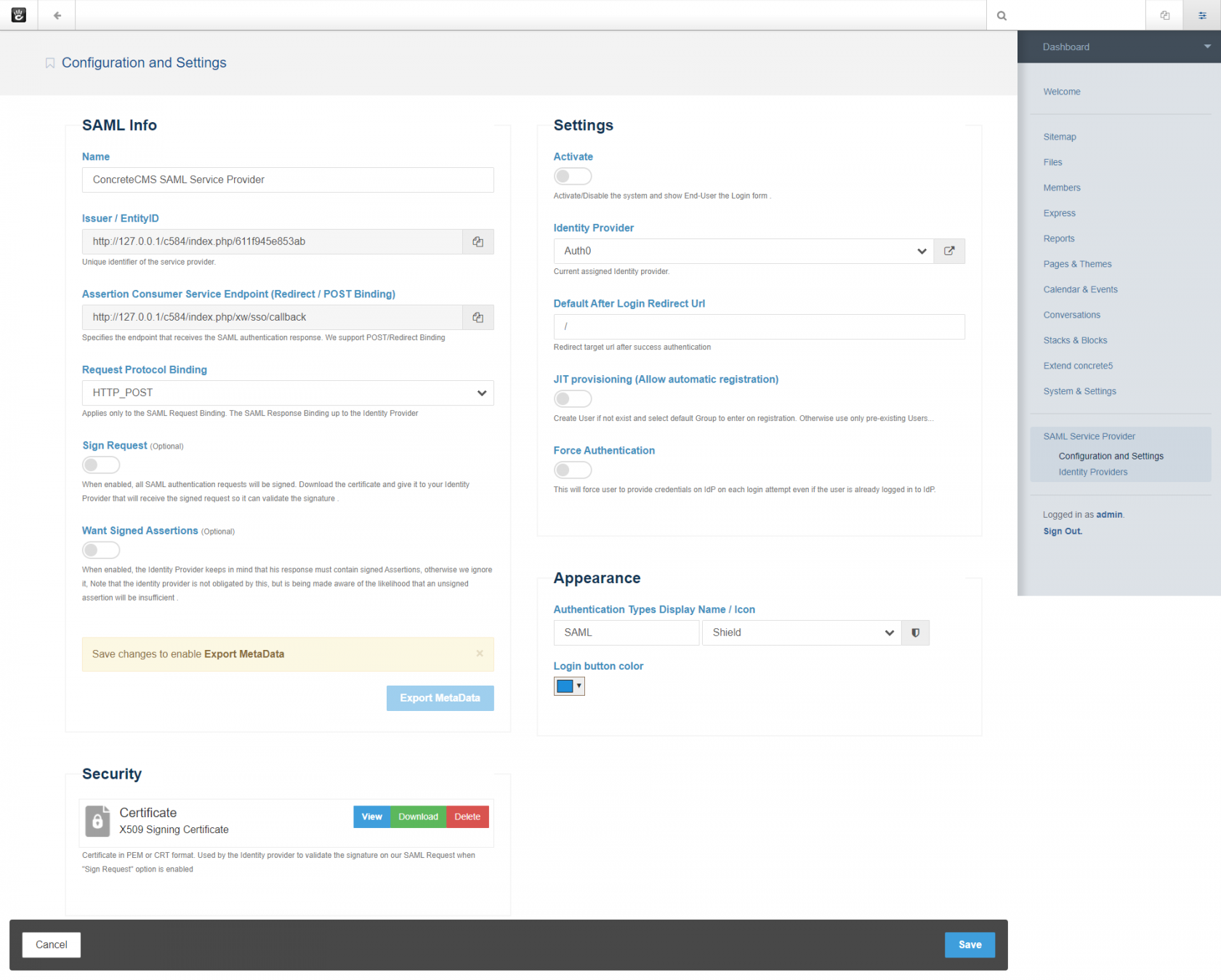
Add the SAML informations on this page to the Identity Provider (IdP) administration side page so the tenant knows how to receive and respond to our SAML authentication requests.
If the IdP supports uploading a Metadata file, you can simply provide the file obtained in the step below.
SAML Metadata file is the standard format for exchanging configuration information between SAML service provider and the Identity provider . SAML metadata is supplied to partner Identity providers so they can update their
configuration .
Click Export Metadata button in the bottom of SAML Info section to download an XML file of your SAML configuration settings to send to your Identity provider .
You must Save new changes to enable Export again If you already change some values .
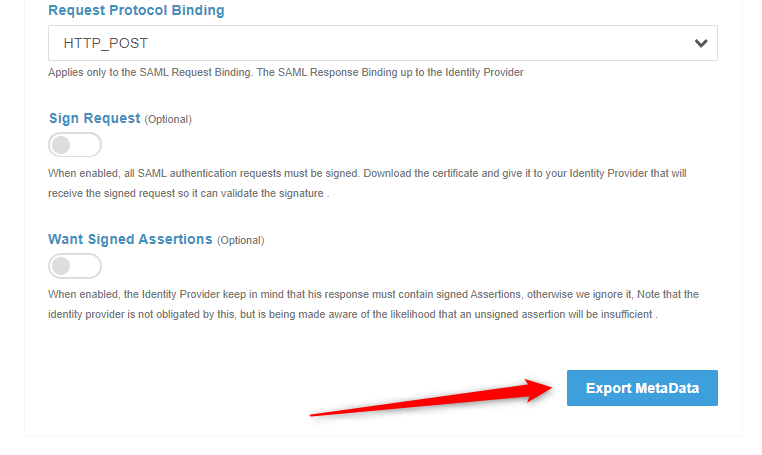
The Identity provider can then upload these configuration settings to connect to our SAML Service provider package .
If the IdP does not support uploading a Metadata file, you can configure it manually as follows. You will need to use some of this informations from this screen to configure it .
FIELD |
DESCRIPTION |
Name |
Your service provider name for reference |
Entity ID / Issuer |
The unique identifier of the Service providerThis value is prepopulated. It is generated by the system ( Read only ). |
Assertion Consume Service (ASC) Endpoint |
Often referred to simply as the Sign-in URL or Application Callback URL . This is the endpoint provided where SAML responses are posted by Identity provider after it has authenticated a user .This value is prepopulated. It is generated by the system ( Read only ). |
Request protocol Binding |
Choose the binding mechanism your identity provider requests for your SAML messages.
|
Sign request (optionel) |
Indicates whether our Service provider signs the SAML authentication request when it initiates the single sign-on flow. So all sent requests to the Identity provider will be signed .This option overrides the IdP config setting Want AuthnRequest Signed . When selected, you must provide the Identity provider with a copy of your Certificate to verify the validity and provenance of the SAML requests from your service provider.So, you can send a signed SAML request from your Service provider to the IdP to verify your SP as an authentic service provider. you can configure your IdP to use the certificate stored in the security section to ensure the SAML request originates from your Service provider Get your certificate in the "Security" section. |
Want Signed Assertions(optionel) |
Defines whether SAML assertions coming from Identity Providers (IdPs) must be signed., Note that the Identity provider is not obligated by this, but is being made aware of the likelihood that an unsigned assertion will be insufficient . |
Certificate |
An X.509 certificate and associated private key are required if SAML messages sent by our service provider (SP) are to be signed (When the Sign Request option is enabled) |
NameID format |
urn:oasis:names:tc:SAML:1.1:nameid-format:emailAddressEnsure that you configure the as Email format. |
Recipient |
Typically the same value as our Entity ID / IssuerThis value is not required for all integrations. |
Audience |
Typically same value as our Assertion Consume Service (ASC) EndpointThis value is not required for all integrations. |
SAML Offset Minutes |
Set to make up for time differences between devices.This value is prepopulated. It is generated by the system : 5 minutes.
|
Our service provider (SP) requires certain attribute information to be received from the IDP when a user signs in using SAML logins. The NameID attribute is mandatory and must be sent by your IDP in the SAML response to make the federation with ConcreteCMS work. Since Our SP uses the value of NameID to uniquely identify a named user, it is recommended that you use a Email format value.
The IdP needs to pass certain information in order for our SP to either create an account, or match the login information to an existing account. Email is the minimum amount of information that needs to be passed. If the IdP is not providing this information, all SAML requests fail. Make sure this information is provided.
We automatically uses the SAML NameID to identify users in ConcreteCMS . We recommend setting and configure your IdP so that NameID format is Email Address .
We specifies urn:oasis:names:tc:SAML:1.1:nameid-format:emailAddress for the format of the NameIDPolicy in assertion requests.
At a minimum, If there is no NameID element with Email Address Format, the user’s email address must be specified as an Assertion Attribute. The name of the Attribute that specifies user email address must be configured as email or mail or http://schemas.xmlsoap.org/ws/2005/05/identity/claims/emailaddress
Contact the administrator of the identity provider if you need help determining which source of metadata information you need to provide.
No matter what Request Binding you select, the SAML response up to Identity provider side configuration . We currently support POST and Redirect Binding fror SAML response .
Most Identity providers requires at least the following : Assertion Consume Service (ASC) Endpoint .
Requests and responses must conform to the SAML protocols for exchanging information .
Your IdP must support SAML 2.0 to connect with our ConcreteCMS SAML service provider .
Some Identity providers cannot accept a signed authentication request ( when Sign Request option is enabled ) .
Sign Request is optional. Some Idps does not validate signed authentication requests even a signature is present.
If the Want Assertion Signed flag is set and neither the SAML response nor SAML assertion is
signed or the signature cannot be verified, this is considered an error .
However, certain changes in the Service provider will impact your SAML configuration. If any of these changes occur, the metadata is automatically updated on your SP side, but you will need to update the information on the Identity Provider side so that message exchange can occur successfully.
As always with SAML2, you can't expect all Idps to support everything. you have to test if your Idp supports some required options
Many SAML terms can vary between providers. It is possible that the information you are looking for is listed under another name. For more information, start with your identity provider’s documentation. Look for their options and examples to see how they configure SAML. This can provide hints on what you’ll need to configure our Service provider to work with these providers.
The following articles outline configuration instructions for four common third-party Identity providers:
-
Configuring Auth0 SAML Identity provider
-
Configuring OneLogin SAML Identity provider
-
Configuring Keyloak SAML Identity provider